
A business should not choose a TikTok posting time from a universal chart. It should choose a window where audience activity, campaign context, and the team’s ability to respond overlap. That answer will be different for a restaurant promoting lunch, a retailer launching a product, and a software company publishing education for an international audience.
The practical goal is not to discover one perfect hour. It is to build a small set of repeatable windows, understand the job each window does, and keep testing as the audience and business change.
Platform guidance and interfaces were reviewed September 10, 2026. TikTok features can vary by account, region, and app version.
The short answer: publish for the business moment
Start with the hours when your audience is active, then work backward from the action the post is meant to create. A restaurant special should appear before people make the meal decision. A live-event post needs to arrive while the event still matters. A product launch may need an early explanation, a release moment, and a follow-up window rather than one isolated upload.
If your analytics show a dependable activity peak, test publishing 30, 60, and 90 minutes before it. That is a hypothesis, not a platform rule. The right interval depends on how quickly your viewers respond and how the post continues to travel after its initial release.
Why the old day-by-day timetable was misleading
The original article listed 21 precise times, including Tuesday at 2 a.m., Thursday at noon, and Saturday at 8 p.m. It then explained those hours with guesses about sleep interruptions, brunch, school, work, and weekend routines. That creates a convincing story after the fact, but it does not establish that those behaviors belong to your customers.
Aggregated studies mix industries, regions, account sizes, creative quality, and audience demographics. They can help an account with no history choose its first test windows. They cannot establish a permanent schedule for an individual business.
Timing is one recommendation signal among many
TikTok’s current explanation of how it recommends content groups signals around user interactions, content information, and user information. Their relative influence can vary. That makes timing useful, but it does not support the idea that posting at one minute of the day automatically unlocks the For You feed.
A business post still needs a clear subject, a strong opening, relevant language, and a reason for the right viewer to keep watching or act. Timing should improve the chance that relevant people are present. It cannot compensate for a video made for no one in particular.
Build a schedule from first-party audience data
Use the analytics available through TikTok Studio to review audience activity, viewer locations, and post performance. Look for recurring patterns across weeks, not one viral video. If the account serves several regions, note the local time for each important audience instead of defaulting to the headquarters time zone.
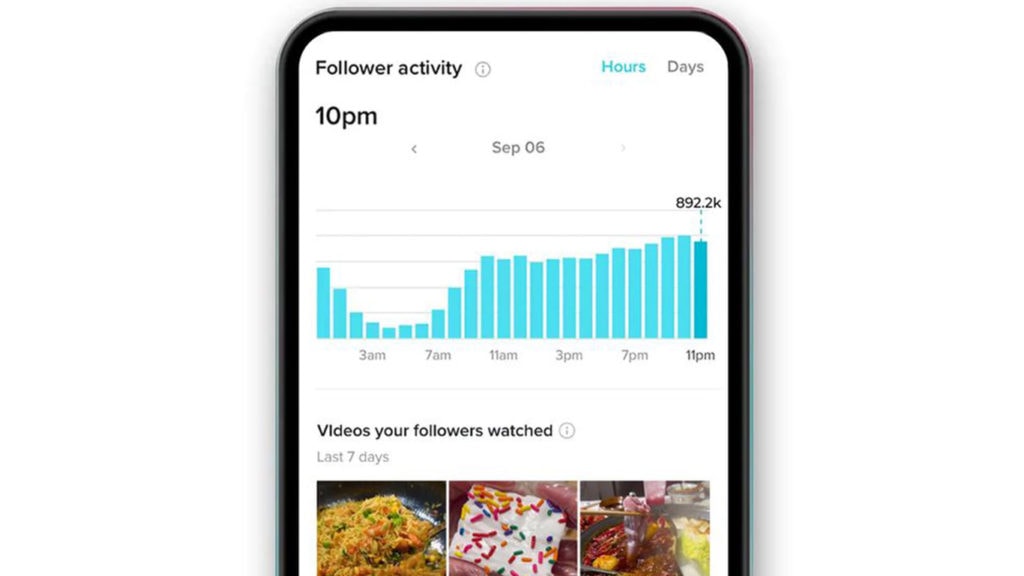
Do not assume the analytics time zone. Confirm how the current interface reports time and document the conversion in the team calendar. Daylight-saving changes and distributed teams can turn an apparently simple schedule into avoidable mistakes.
Choose windows by business job
| Business job | Timing question | Useful outcome |
|---|---|---|
| Local demand | When do customers make the nearby purchase decision? | Directions, calls, bookings, or store visits |
| Product launch | When can the audience watch, ask questions, and buy? | Qualified traffic, product views, or sales |
| Education | When will the audience give the explanation enough attention? | Completion, saves, shares, or follow-up questions |
| Community | When can the team participate after posting? | Meaningful comments and repeat participation |
| Live moment | When does relevance expire? | Timely attention rather than delayed reach |
This framing prevents a common mistake: optimizing every post for the largest possible view count. A local business may prefer fewer views from nearby people. A considered purchase may value saves, profile visits, and product-page traffic. A support-oriented post may succeed because it reduces repeated questions.
Run a four-week business test
Business accounts usually need more control than a casual creator test because products, offers, staffing, and approval cycles change the result. Select three windows from audience activity and business context, then rotate comparable posts through them for four weeks.
- Define the job. Give each post one primary audience and one intended outcome.
- Control the creative variables. Keep topic, format, length, and production effort reasonably comparable.
- Rotate the windows. Avoid placing every strongest idea in the time you already favor.
- Review at consistent intervals. Compare first hour, 24 hours, and seven days where practical.
- Record operating context. Note promotion, paid support, creator collaboration, breaking news, and inventory constraints.
Four weeks will not eliminate noise, but it is long enough to expose whether a pattern deserves another cycle. Revisit the schedule when seasonality, product mix, audience geography, or posting frequency changes.
Measure business value and content quality separately
Track distribution signals such as views, average watch behavior, completion, shares, saves, comments, and profile visits. Then connect them to the outcome the business owns: qualified site sessions, offer redemptions, leads, bookings, sales, support deflection, or another meaningful action.
A time window can improve reach while weakening conversion, or produce fewer views with a stronger commercial result. Keep those questions separate. Otherwise, the team may optimize the schedule for attention that does not serve the business.
Schedule for response, not just release
A business post can generate questions about availability, sizing, pricing, locations, or support. Publishing when no one can respond may waste the most valuable part of the attention. Include community management, escalation, and customer-service coverage in the schedule—especially for launches, offers, and sensitive topics.
Travel does not require masking the account’s location with a VPN. Keep the target audience’s time zone in the calendar and use scheduling where available. TikTok considers multiple signals, and audience relevance cannot be reduced to an IP address.
Use trends without surrendering the brand
TikTok’s Creative Center trends can help a team read current sounds, hashtags, creators, and content patterns by region or category. Treat that as context. A trend should earn its way into the plan by fitting the brand, audience, and objective.
The same principle applies to timing. A live event, announcement, or cultural moment may justify publishing outside the normal window because relevance expires. A durable educational post can wait for a stronger attention period. The calendar should help the business make that distinction.
The schedule is a system, not a secret
Once the data shows two or three dependable windows, give most posts to them and reserve a smaller share for experimentation. Document the audience time zone, purpose, owner, response coverage, and measurement checkpoint for each release. That turns posting time from folklore into an operating habit.
Individual creators have different constraints and may optimize for community depth rather than a business outcome. The companion guide explains how to find TikTok posting windows for creators. In both cases, the best time is the one your own audience and objectives continue to prove.
